A complete, polished look for ElvUI. Plus everything it doesn't ship.
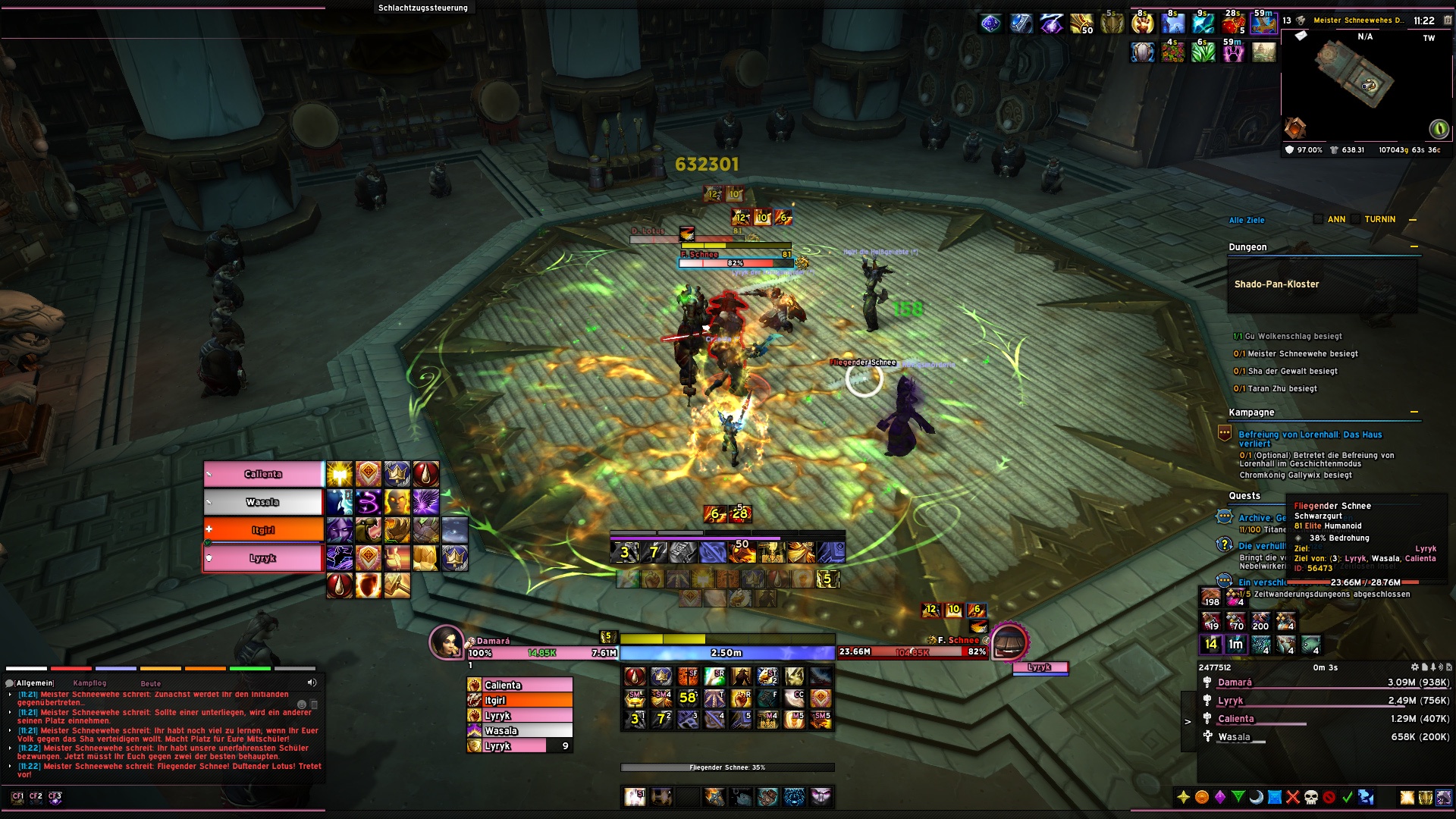
MerathilisUI gives your interface a clean, transparent design with class-colored gradients and adds modules that go far beyond ElvUI. Everything is modular: turn off what you don't need, keep the rest.
The installer sets up ElvUI, chat, action bars, data texts, nameplates, unit frames and profiles for popular addons in a few steps.
Consistent design everywhere
Blizzard windows, ElvUI and supported addons get the same shadows, gradients and flat widgets - even the ElvUI options window.
Features ElvUI doesn't have
Categorized bags, a full Armory, a chat sidebar, Mythic+ info on hover, a buff reminder and much more.
Actively maintained
Regular updates for the current Retail patch, and bugs reported on Discord get fixed.
Feature highlights
Every corner of your UI, refined. Each module can be turned on or off on its own in the options.
MerathilisUIFeatures
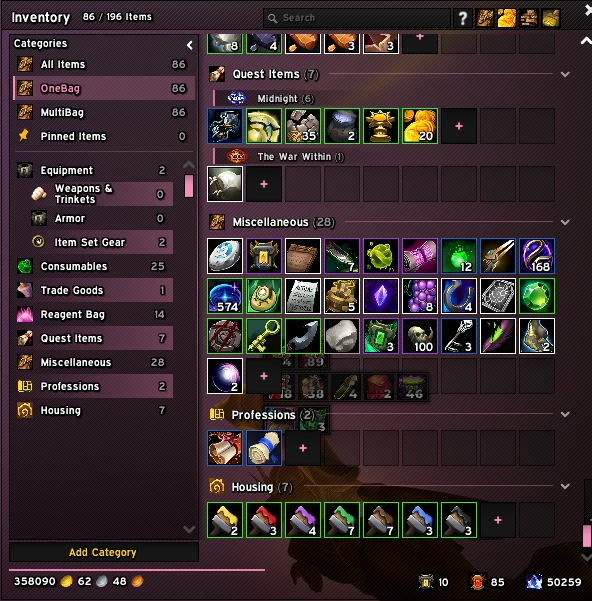
CategorizedBags
Categories, pinned items and merged stacks
Bags
Categorized Bags
A category sidebar with pinned and recent items, custom categories and sub-headers per expansion and equipment set. Identical stacks merge into one slot and the windows shrink to fit.
MerathilisUIFeatures
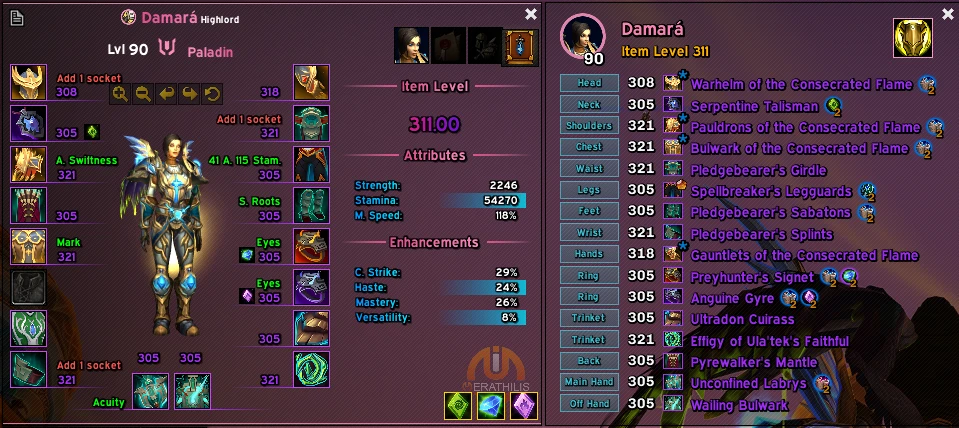
TheArmory
Item level, enchants and sockets at a glance
Character Frame
Armory
Redesigned character and inspect frame with class backgrounds, item level, enchants and sockets per slot, plus a built-in equipment set manager.
Screenshot shows the Armory together with the ElvUI_WindTools additions.
Chat & Minimap
Chat Sidebar with friends, guild, durability and M+ portals, a Location Panel above the minimap and a bar for all addon buttons.
Combat & Group Content
NameHover with Enemy Forces in Mythic+, Buff Reminder, Movement Alert, Battle Res tracker, Loot Spec Manager and Spec Bar.
Notifications
Rare mobs, new mail, Great Vault rewards, Call to Arms, low durability, full bags, guild events and currency caps.
Unit Frames & Theme
Gradient, Dark and class-colored health, power and castbars with extra styling for player, target, party, raid and boss frames.
Quality of Life
Mail tools, profession tabs, transmog export, Wowhead links, a styled game menu, AFK screen and a cursor ring with GCD and cast progress.
Latest release
Always improving - detailed notes for every version.
Version 7.36
25.09.2026
New
Chat: New Chat Sidebar - a slim icon bar inside (or next to) the left or right chat panel with online friends/guild counters, durability, copy chat, M+ portals, chat channels, settings and a scroll-to-bottom button that lights up while the chat is scrolled up. Its copy button replaces ElvUI's (right-click opens the chat menu), its channel button takes over Blizzard's voice buttons on the chat panel - it lights up while a voice channel is active, turns into a crossed out microphone while you are muted or deafened and toggles the microphone (right-click) or the speakers (middle-click) - and the icons can be reordered with Shift + drag.
Chat: Chat panels can be resized by dragging the grip that shows in their corner while hovering them (new "Lock Chat Size" option to hide it). The right panel only gets one while it shows a backdrop or holds a chat window.
Chat: The active combat log filter is shown in your class color, the others are dimmed.
Improvements
Maps: Minimap Buttons - the M+ Portals flyout is now shared with the Chat Sidebar.
Maps: Minimap Buttons - new Addon Compartment button in the Elements bar, it opens Blizzard's addon list and replaces the counter on the Minimap.
Bags: Categorized Bags - the Bank window has its own Sort button, sorting whichever bank it shows (character or Warband) and asking first like Blizzard's bank does.
Fixes
Bags: Categorized Bags - splitting stacks works again: Shift+click splits like in Blizzard's bags (links in chat only while a chat box is open), the split-off part is put into a free slot right away, and a split item isn't merged back into one slot until the bags close.
Maps: Minimap Buttons - the Great Vault button stops pulsing as soon as the reward is claimed instead of only after opening the vault again.
Bags: Categorized Bags - right-clicking a piece of gear equips it again when you already wear another copy of the same item (a different upgrade level, a second ring or trinket). Right-click now acts on the bag slot itself instead of looking the item up by name, which also makes selling at a merchant and depositing at the bank behave exactly like Blizzard's bags.